
AMD
4 Best Motherboards for the Ryzen 5 9600X
The Ryzen 5 9600X is a 6-core, 65W chip — it doesn't need an expensive motherboard. The real question is how much board to buy now so the platform still suits you if you upgrade the CPU later.
Disclosure: As an Amazon Associate I earn from qualifying purchases. Product picks come from manufacturer documentation and independent reviews; we have not tested these boards ourselves.
AMD lists the Ryzen 5 9600X with 6 cores, 12 threads, 32MB of L3 cache and a 65W default TDP. That modest power draw means almost any decent AM5 board will run it comfortably. Spending more on the motherboard won't make your games faster — the graphics card does that.
So the smart way to choose is to think a step ahead. AM5 already spans three Ryzen generations, and the boards here list support for Ryzen 7000, 8000 and 9000. If there's a chance you'll drop in a bigger CPU later, buying a board with sturdier power delivery and more storage now can save a second purchase. These four boards cover both approaches.
Top 3 picks for the Ryzen 5 9600X
The short version: the B850 Tomahawk MAX for most builds, the ASRock for the tightest budgets, and the Strix B850-G for small cases.
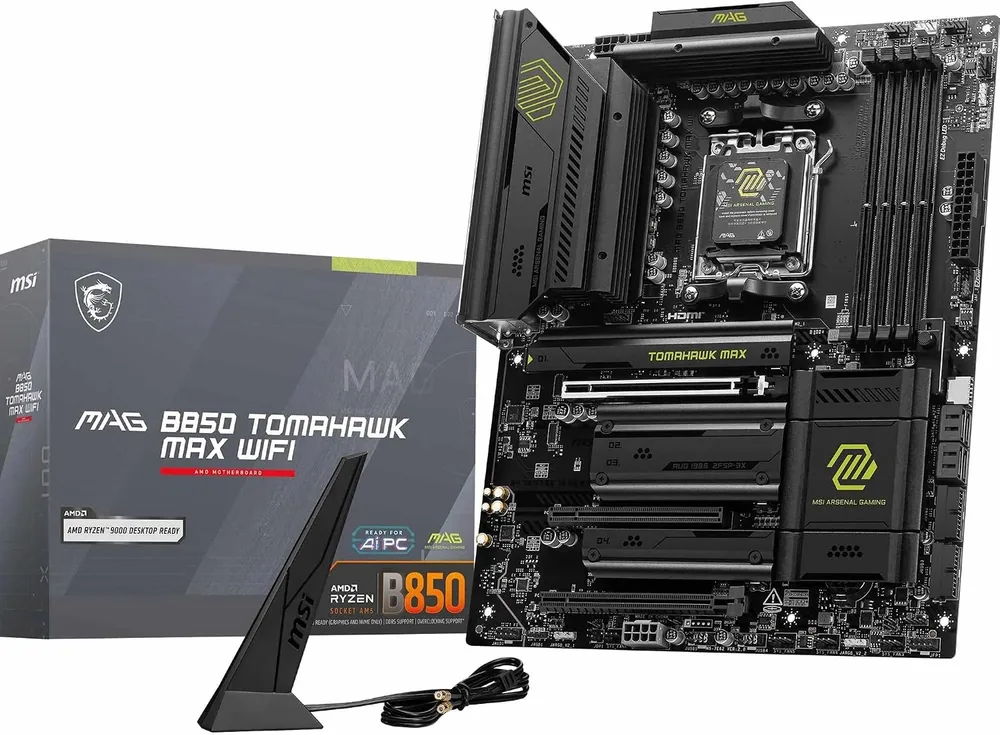
MSI MAG B850 Tomahawk MAX WiFi
- B850
- 2× Gen5 M.2
- 5GbE
- Wi-Fi 7
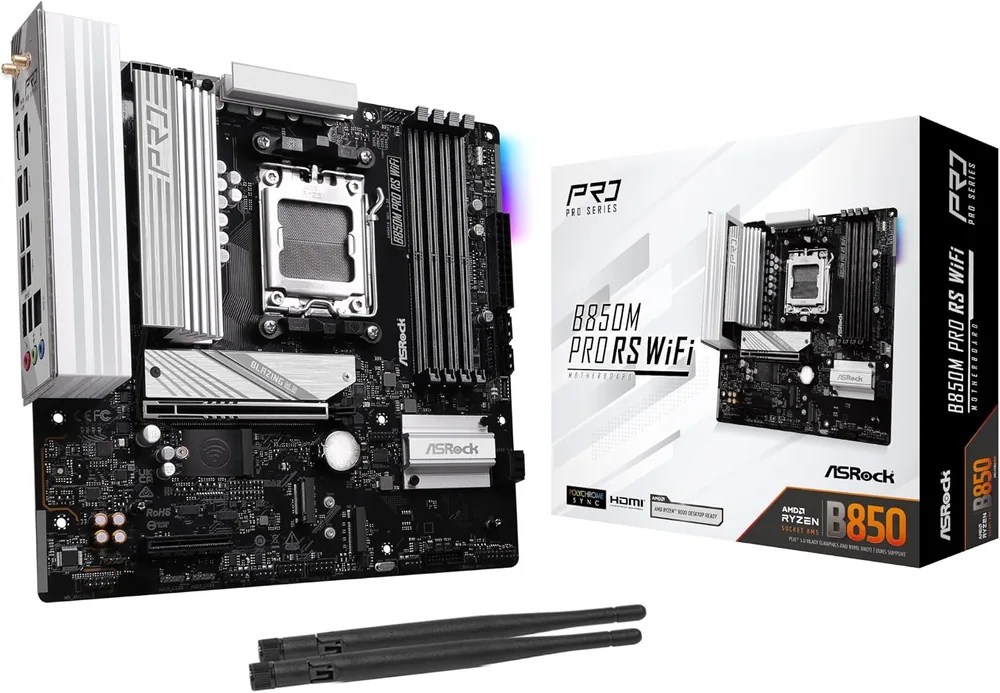
ASRock B850M Pro RS WiFi
- B850
- Micro-ATX
- BIOS Flashback
- Wi-Fi 6E
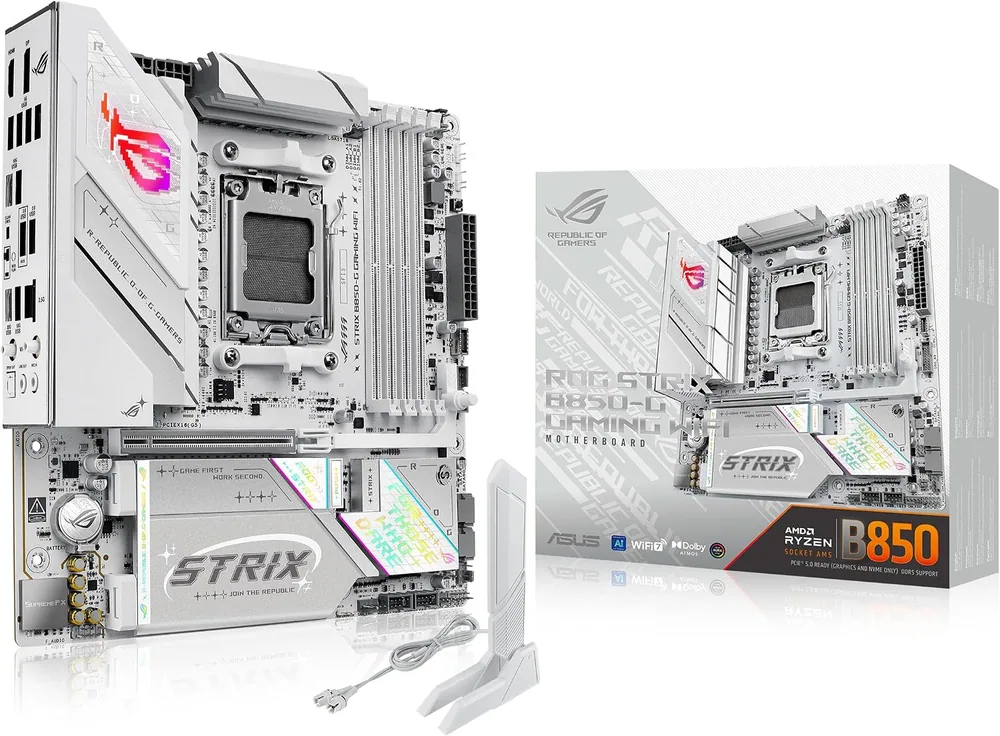
ASUS ROG Strix B850-G Gaming WiFi
- B850
- 4× M.2
- Wi-Fi 7
- White colorway
Best motherboards for the Ryzen 5 9600X compared
| Product | Key specifications | Buy |
|---|---|---|
 Best overallMSI MAG B850 Tomahawk MAX WiFi |
| View on Amazon |
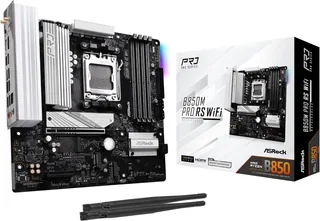 Best budgetASRock B850M Pro RS WiFi |
| View on Amazon |
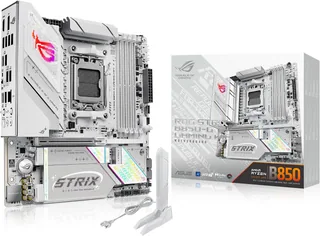 Best compactASUS ROG Strix B850-G Gaming WiFi |
| View on Amazon |
 Best for upgradingMSI MAG X870E Tomahawk WiFi |
| View on Amazon |
1. MSI MAG B850 Tomahawk MAX WiFi – Best Overall
Editor's choice Specifications
- Socket
- AM5
- Chipset
- AMD B850
- Memory
- 4× DDR5
- GPU slot
- PCIe 5.0 x16
- M.2
- 2× PCIe 5.0 x4, 1× PCIe 4.0 x4, 1× PCIe 4.0 x2
- Network
- 5GbE LAN · Wi-Fi 7 · Bluetooth 5.4
Pros
- Full-bandwidth GPU slot
- Two Gen5 M.2 slots on CPU lanes
- 5GbE and Wi-Fi 7
- Flash BIOS button
Cons
- No USB4
- Third M.2 slot limited to PCIe 4.0 x2
The B850 Tomahawk MAX WiFi is the board we'd put under most 9600X builds. It has the same PCIe 5.0 x16 graphics slot as pricier boards, two Gen5 M.2 slots on their own CPU lanes, 5GbE and Wi-Fi 7 — and with two 8-pin CPU connectors, it won't hold you back if you later move up to a Ryzen 7 or Ryzen 9.
Built for a later CPU upgrade
This is the strongest argument for it over a cheaper board. A 9600X barely asks anything of the power delivery; a future 16-core chip will. Buying the Tomahawk once covers both.
No USB4, and a slower third M.2 slot
No USB4, and the third M.2 slot runs at PCIe 4.0 x2 and shares lanes with the bottom expansion slot. Neither matters for a typical gaming build.
2. ASRock B850M Pro RS WiFi – Best Budget
Specifications
- Socket
- AM5
- Chipset
- AMD B850
- Memory
- 4× DDR5
- M.2
- 1× PCIe 5.0 x4, 2× PCIe 4.0 x4
- BIOS
- BIOS Flashback button
- Network
- 2.5GbE LAN · Wi-Fi 6E · Bluetooth 5.2
Pros
- PCIe 5.0 GPU and M.2 slots
- BIOS Flashback
- Four DDR5 slots
- Wi-Fi 6E included
Cons
- Only one M.2 heatsink
- Front USB-C limited to 5Gbps
- Third M.2 disables PCIE2
If you want to put every spare bit of budget into the graphics card, the ASRock B850M Pro RS WiFi is the board to do it with. It keeps a PCIe 5.0 graphics slot, a PCIe 5.0 M.2 slot, four DDR5 slots, Wi-Fi 6E and — importantly — a BIOS Flashback button.
Plenty for a 65W chip
With 8-pin plus 4-pin CPU power and a mainstream power-delivery design, the board is comfortable with a 9600X at stock settings. It's not the board we'd choose for heavy overclocking or a future 16-core chip.
Wi-Fi 6E, one M.2 heatsink, 5Gbps front USB-C
Only the Gen5 M.2 slot has a heatsink, the front USB-C header runs at 5Gbps, and using the third M.2 slot disables the second PCIe slot. It's Micro-ATX, so check your case.
3. ASUS ROG Strix B850-G Gaming WiFi – Best Compact
Specifications
- Socket
- AM5
- Chipset
- AMD B850
- Memory
- 4× DDR5
- M.2
- 1× PCIe 5.0 x4, 3× PCIe 4.0 x4
- USB
- Rear 20Gbps Type-C, front 10Gbps Type-C header
- Network
- 2.5GbE LAN · Wi-Fi 7 · Bluetooth 5.4
Pros
- Four M.2 slots
- Wi-Fi 7
- BIOS FlashBack
- 20Gbps rear USB-C
Cons
- Single PCIe slot
- No USB4
- Two SATA ports
For a smaller case, the ROG Strix B850-G Gaming WiFi gives a 9600X build four M.2 slots, Wi-Fi 7, a 20Gbps rear USB-C port and BIOS FlashBack. It comes in a white and silver colorway, which makes it an easy match for a white build.
Storage without sharing
TechPowerUp found all four M.2 slots run without bandwidth sharing — rare on a Micro-ATX board.
One expansion slot, no USB4
One expansion slot, no USB4 and two SATA ports. Fine for a single-GPU build with NVMe storage.
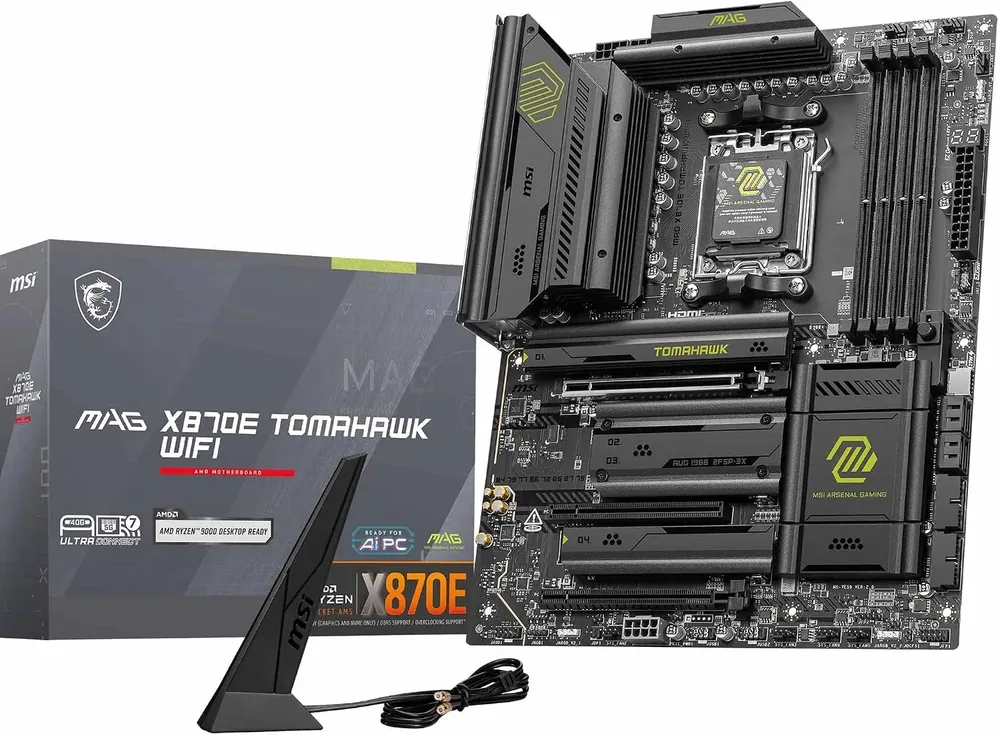
4. MSI MAG X870E Tomahawk WiFi – Best for Upgrading
Specifications
- Socket
- AM5
- Chipset
- AMD X870E
- Memory
- 4× DDR5
- M.2
- 2× PCIe 5.0 x4, 2× PCIe 4.0 x4
- USB4
- 2× 40Gbps Type-C (rear)
- Network
- 5GbE LAN · Wi-Fi 7 · Bluetooth 5.4
Pros
- Dual rear USB4 ports
- Four x4 M.2 slots
- 5GbE and Wi-Fi 7
- Flash BIOS button
Cons
- Second Gen5 M.2 slot shares bandwidth with USB4
- Only one PCIe 5.0 expansion slot
Planning to start with a 9600X and move to a Ryzen 9 later? The X870E Tomahawk WiFi is the board that won't need replacing. It adds two USB4 ports and two full-speed PCIe 4.0 M.2 slots to the core layout of the B850 Tomahawk.
Is it overkill for a 9600X?
For the CPU alone, yes. It earns its place only if you'll use USB4 or upgrade the CPU. Otherwise the B850 Tomahawk MAX gives you nearly everything for less.
Second Gen5 slot shares with USB4
The second Gen5 M.2 slot shares bandwidth with the USB4 ports, so both run at PCIe 5.0 x2 when that slot is used.
Why these four — and the boards we left out
For a 65W six-core chip, we prioritized boards that don't make you pay for features the CPU can't use, while keeping BIOS Flashback and room to upgrade. That excluded three boards from our wider shortlist:
- ASUS ROG Crosshair X870E Hero: three Gen5 M.2 slots and heavy power delivery are wasted on a 9600X unless you're already planning a Ryzen 9.
- ASUS ProArt X870E-Creator WiFi: 10GbE and x8/x8 expansion are workstation features; a 9600X gaming build won't use them.
- The Intel boards use a different socket.
How to decide between them
Will you upgrade the CPU?
If yes, choose a board with two 8-pin CPU connectors — the B850 Tomahawk MAX, Strix B850-G or X870E Tomahawk. The ASRock's 8-pin plus 4-pin setup is fine for the 9600X but is the one we'd replace first if you move to a 16-core chip.
ATX or Micro-ATX?
The ASRock and the Strix B850-G are Micro-ATX. The ASRock keeps a second PCIe slot and four SATA ports; the Strix trades those for four M.2 slots and Wi-Fi 7. Our Micro-ATX guide compares them side by side.
Wi-Fi 6E or Wi-Fi 7?
Only the ASRock has Wi-Fi 6E. If your router is Wi-Fi 6E or older, the difference won't show; with a Wi-Fi 7 router, choose one of the other three. Wired, the MSI boards have 5GbE and the others 2.5GbE.
Do you need USB4?
Only the X870E Tomahawk has it. For a gaming PC without fast external drives, you won't miss it.
Three mistakes 9600X builders make
Spending on the motherboard instead of the graphics card. A flagship board adds no frame rate to a 9600X.
Buying a board without BIOS Flashback. If the board shipped with older firmware, you'd need a supported CPU to update it. All four boards here have the button.
Picking Micro-ATX without checking expansion. The Strix B850-G has a single expansion slot — fine for one GPU, a problem if you add a capture or network card later.
FAQs
What chipset is best for the Ryzen 5 9600X?
B850 for most builds. It supports the 9600X, PCIe 5.0 storage and overclocking. Choose X870E only for USB4 or extra connectivity.
Is a Micro-ATX board fine for the 9600X?
Yes. The 9600X's 65W TDP is easy for a good Micro-ATX board; just check your case's airflow and expansion needs.
Can I overclock the 9600X on B850?
Yes. AMD lists the 9600X as unlocked, and B850 supports CPU overclocking.
Will I need a BIOS update?
Check the board's CPU support list for the minimum BIOS version. Our compatibility guide covers how.
Best motherboards for the Ryzen 5 9600X: final call
For most 9600X builds, the MSI MAG B850 Tomahawk MAX WiFi is the right board: everything a gaming PC needs and the headroom for a bigger CPU later. On a tight budget, the ASRock B850M Pro RS WiFi lets you spend more on the graphics card without losing BIOS Flashback or PCIe 5.0. For a compact or white build, choose the ROG Strix B850-G Gaming WiFi, and if you're already planning a Ryzen 9 upgrade, the X870E Tomahawk WiFi is the board you won't outgrow.
Looking at a bigger chip? See the best motherboard for the Ryzen 9 9950X or the Ryzen 7 9800X3D, or compare all our picks in the best motherboards guide.