
Form & Budget
ATX vs Micro-ATX vs Mini-ITX: Which Motherboard Size Do You Need?
Motherboard size decides your case, how many expansion cards and drives you can fit, and how easy the build is. Here's what you actually give up as boards get smaller.
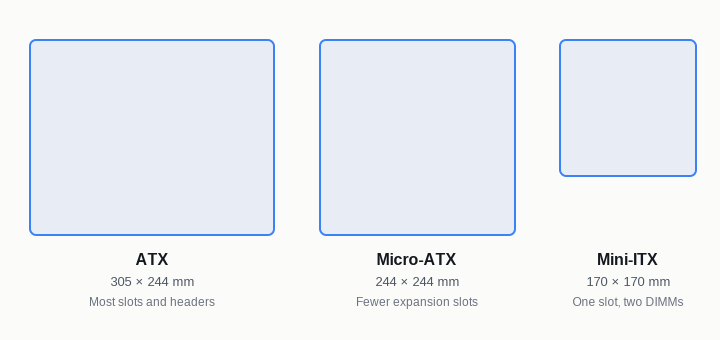
The three sizes at a glance
| ATX | Micro-ATX | Mini-ITX | |
|---|---|---|---|
| Size | 305 × 244 mm | 244 × 244 mm | 170 × 170 mm |
| Typical expansion slots | Several | Fewer (often one or two) | One |
| Typical memory slots | 4 | Usually 4 | 2 |
| M.2 and headers | The most | Fewer | Fewest; some slots on the back |
| Case options | Mid and full towers | Compact towers and ATX cases | Small-form-factor and larger cases |
"Typical" matters: layouts vary by model, so always check the specific board. For example, the ASUS ROG Strix B850-G Gaming WiFi fits four M.2 slots into Micro-ATX, while the ASRock B850M Pro RS WiFi has three.
ATX: the default choice
ATX gives you the most expansion slots, M.2 slots and fan headers, and the most cases to choose from. It's the right choice if you might add a capture card, extra network card or several SSDs, or simply want the easiest build. Most of our top motherboard picks are ATX.
Micro-ATX: small, with few compromises
Micro-ATX keeps four memory slots and a full-length graphics slot on most boards, so a typical gaming PC with one GPU loses very little. You give up extra expansion slots and sometimes M.2 slots or SATA ports. See our best Micro-ATX motherboards for two picks with different strengths.
Mini-ITX: smallest, with real trade-offs
Mini-ITX boards have one expansion slot and two memory slots, and often move an M.2 slot to the back of the board. They suit compact living-room or travel PCs. Because everything is packed tightly, rear-mounted M.2 drives can run without heatsinks — the ASUS ROG Strix B850-I Gaming WiFi's rear slot has none, for example — so choose cool-running SSDs, and check cooler and graphics-card clearance in the case. Our recommendations are in the best Mini-ITX motherboards.
How to choose
- Start with the case. A case lists which board sizes it supports; larger cases accept smaller boards.
- Count what you'll plug in. More than one expansion card or lots of drives points to ATX.
- Check the memory plan. Two memory slots on Mini-ITX limit upgrade options.
- Read the lane-sharing notes. Smaller boards more often share bandwidth between M.2 and expansion slots.
Building on a tight budget? Micro-ATX boards are often the best value — see the best budget motherboards.
As an Amazon Associate I earn from qualifying purchases.